
Scaling a Cohesive React Icon System Across Distributed Gamedev Teams
Managing a shared React library for five independent product pods exposes visual inconsistencies fast. One gamedev team builds an administrative dashboard. Another ships a consumer-facing mobile app. Sometimes a third group iterates on internal analytics tools. Asset requirements multiply rapidly. Building every vector in-house demands a dedicated illustration team. Piecing together web downloads creates a disjointed interface. Icons8 provides a better alternative to hand-managing custom graphics.
The Problem With Standard Icon Sourcing
Before committing to a central platform, engineering teams usually try three distinct approaches.
First up are open-source packs like Feather or Heroicons. They look exceptionally well-designed but lack deep variety. Covering the basics works beautifully. You will easily find an alignment grid or user profile graphic. Finding a specific database node or niche financial metric proves impossible.
Second, developers turn to massive community repositories like Noun Project or Flaticon. Volume problems vanish instantly. Consistency nightmares quickly replace them. Thousands of independent authors contribute wildly different styles. Line weights clash constantly. Corner radiuses vary across the board. Visual metaphors rarely align well.
Third, designers try to build everything internally. Guaranteed consistency creates a massive workflow bottleneck. Waiting two weeks for a custom graphic holds up sprint deliverables.
Icons8 bypasses these exact issues through sheer volume and strict style guidelines. Over 1.4 million icons populate 45 distinct visual styles. Pack sizes scale massively. Finding obscure metaphors perfectly matching your core UI becomes surprisingly easy. Just the iOS 17 style alone contains 30,000 vectors.
Populating a Component Sprite
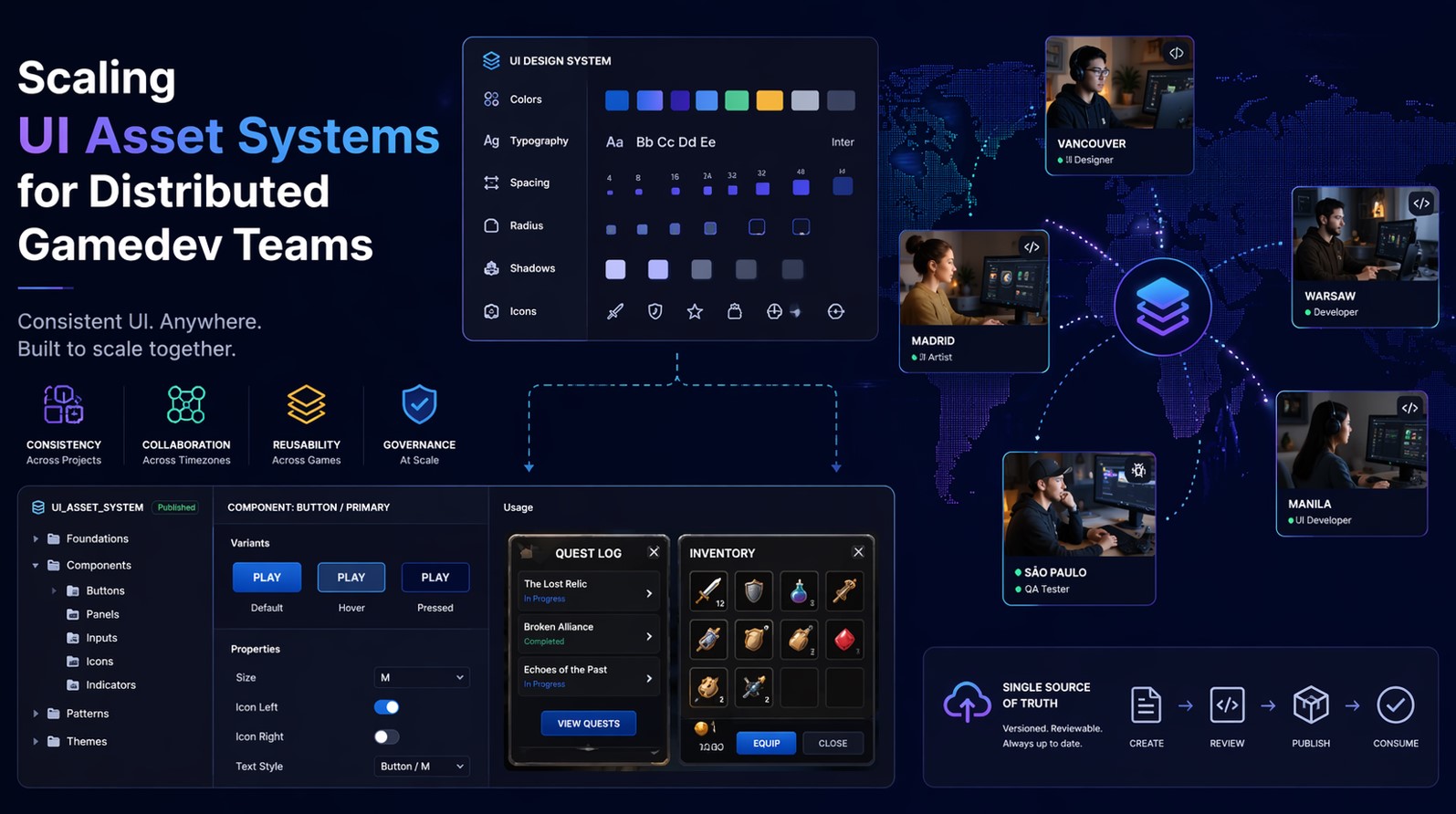
Setting up the platform starts by building a core asset pipeline. We don’t download individual files. Everyday workflows rely heavily on the Collections feature instead.
Building our core navigation sprite requires creating a new web Collection. Library searches accept both text and image queries. Suppose our logistics team needs a delivery truck. We type the text query. Next, filtering strictly by “Material Outlined” matches our Android guidelines perfectly. A quick drag drops the result into our workspace.
Spotting the right arrow symbol takes seconds. Sourcing one matching the exact line weight of your database icon proves much harder. Strict visual rules guarantee a flawless match here. Grabbing an arrow from that same Material Outlined pack ensures matching padding and stroke width.
Once your Collection contains all required release assets, bulk recoloring becomes critical. Applying our core slate gray HEX code updates the entire batch simultaneously. Exporting the group as an SVG sprite takes one click. Our generic component consumes this file directly. Interface visuals instantly update across all five product environments.
Navigating a Feature Freeze Without Design Support
Late Thursday afternoons during strict code freezes perfectly illustrate system value. One onboarding pod realized they lacked a graphic for a biometric security toggle. They also needed a corresponding loading state. Our internal design team had already signed off for the weekend.
Stalling the pull request wasn’t an option. Inserting a mismatched placeholder felt sloppy. That frontend lead logged into Icons8 instead. Navigating to animated formats revealed exact UI styles matching our core app. They located a spinning fingerprint scanner saved as a Lottie JSON file. Grabbing the static SVG version provided the default state. Downloading the JSON handled the active animation.
Both assets matched the application guidelines flawlessly. Code was pushed and merged within twenty minutes. Nobody drew a single custom vector path.
Bridging the Developer and Design Divide
Standardized systems only work when non-technical teams jump on board. Marketing managers, technical writers, and product designers constantly need exact application assets.
Native integrations make sharing painless. Product designers creating mockups install a Figma plugin. Technical writers building out documentation wikis rely on a Google Docs add-on. Pitch decks get built using Pichon, their native Mac app.
Users drag assets directly into presentation software. Suppose a product manager needs to mock up a new Liquid Glass feature. They pull the exact same graphics that developers will eventually fetch from the web.
Quick modifications happen straight inside the browser editor. Requests don’t pile up in the developer queue anymore. Sometimes a marketing coordinator needs a colored background behind a blog post icon. Clicking the asset opens an intuitive editing screen. Adding a circular background takes two seconds.
Applying a custom flat color and adjusting scale padding finishes the job. External design software isn’t necessary.
Expanding Asset Systems into Video Game Development
Specialized User Interface Elements
Game development stretches distributed asset management to its utmost limit. Compared to a typical web-based application, a contemporary video game demands large quantities of specialized user interface elements, such as heads-up displays (HUDs), detailed inventory displays, skill trees, and diegetic interfaces, which are present in the game world itself. When a distributed studio is divided into various time zones, control over these factors becomes a herculean job.
The development of the main menu systems may be being done in a team in Montreal, and developers in Tokyo may be developing the in-game mini-maps. The visual dissonance, in the absence of a centralized, tightly controlled asset library, is immediately made apparent to the player, breaking the sense of immersion and destroying the aesthetic that had been well designed.
Moreover, the recent game engines such as Unreal Engine and Unity have radically transformed the approach of iconography by UI artists. Although legacy games were entirely based on pixel-perfect raster images encoded in huge texture atlases, modern pipelines are becoming more and more open to scalable vector graphics. This shift enables HUD elements to be sharp on a staggering range of resolutions, including a 720p handheld console screen, all the way up to a giant 4K ultra-wide gaming display.
Bottlenecks
But this flexibility creates new bottlenecks in the workflow. Technical artists must pay close attention to optimizing SVGs to avoid excessive draw calls or clogging the frame rate during the climax of the game. Video game development performance budgets are notoriously tight, and efficient asset delivery is not only a technical requirement but a convenience as well.
This becomes a particularly challenging task when developing cross-platform games. Title releases on PC, PlayStation, Xbox, and mobile platforms necessitate platform-specific button prompts and iconography. A primary “action” button is a green ‘A’ on Xbox, a blue ‘Cross’ on PlayStation, and a spacebar icon on PC. The need to sustain coherent design language in the process of replacing these important signifiers requires a powerful programmatic asset swapping.
Unless the UI engineering team can find a dependable, easy-to-search collection of standardized icons, developers will have to hard-code the paths to the images or, more often, resize the inappropriate assets to fit the different aspect ratios.
UI Prototyping
The rapid prototyping of UI, even in the indie game development scene, which features much smaller teams, depends on large asset libraries. In a game jam or the first phase of vertical slice, the programmer requires something depicting a placeholder art that is not so awful. A development team of two people can create a complex gameplay system, such as elemental damage types, status effects, or the creation of game components, without needing to wait a few weeks to create custom art, by sourcing clean, royalty-free icons.
Icons8 is a key tool in this regard, providing developers with a set of uniform fantasy RPG skills or a set of sci-fi control panel buttons. It fills the gap between rough functional code and a presentable and playable prototype.
Finally, be it a minimalist puzzle or a huge open-world RPG, the principles of asset management are the same as enterprise software. The interface of the game should be able to convey important information to the player within a fraction of a second. Inconsistent distractions, line weights that do not match the weapon wheel or radically different rendering styles between the pause menu and the game-over screen can have a drastic effect on player retention.
When approached with the same rigor of systematic design as a React component library, including the visual rules, shared collections, and single sources of truth, game studios can do away with visual friction and can dedicate all their efforts to creating enjoyable gameplay.

Where the Platform Shows Friction?
Relying entirely on a third-party asset library comes with specific compromises.
Free tiers simply don’t fit professional product development. Unpaid access strictly limits teams to 100px PNG files. You’ve got to include attribution links back to the source. Lossless scaling, vector paths, and unbranded usage absolutely require a paid plan. Subscriptions unlock SVG and PDF formats immediately. Without paying, vector access only covers Popular, Logos, and Characters categories.
Animated formats introduce distinct limitations. Lottie JSON files provide incredibly smooth web and mobile motion. You can’t modify them in external tools like Lunacy or Mega Creator. What you see in the animated library is mostly what you get.
Massive library sizes demand strict internal discipline. Developers can easily download clashing assets by accident. Stark Windows 11 Outline graphics look terrible next to heavily stylized 3D Fluency items. Nobody will stop you from ruining your user interface by mixing styles blindly.
Guidelines for Implementation
Rolling out an external platform across multiple teams requires specific workflow rules. Visual chaos happens quickly without guardrails:
- Select a single primary style like Material Outlined or iOS 17 Glyph. Mandate its use across the entire component library.
- Uncheck the ‘Simplified SVG’ option in your download settings. React components often need specific vector paths exposed for CSS styling.
- Export Base64 HTML fragments for rapid local prototyping. Do this before permanently adding an asset to your centralized SVG collection.
- Submit requests for missing metaphors through the community portal. Production by internal designers requires eight community votes.
Unified visual languages don’t happen by accident. Rigidly categorized asset libraries solve scaling issues fast. Frontend teams finally enforce design consistency across multiple products. Focus stays on application logic instead of endless vector manipulation.
P.S. Help our team grow by sharing this post across your favorite social media platforms and spreading the word to fellow art lovers everywhere. Take a moment to bookmark this content so you can return to it anytime for fresh inspiration and updates. If you’re looking for creative or commercial collaborations, feel free to reach out directly to the BandurArt team.